Researched by
Based on TESmart’s product, support and policy pages, The Gadgeteer’s review and owner videos, read on November 14, 2026; not a hands-on test by this site.
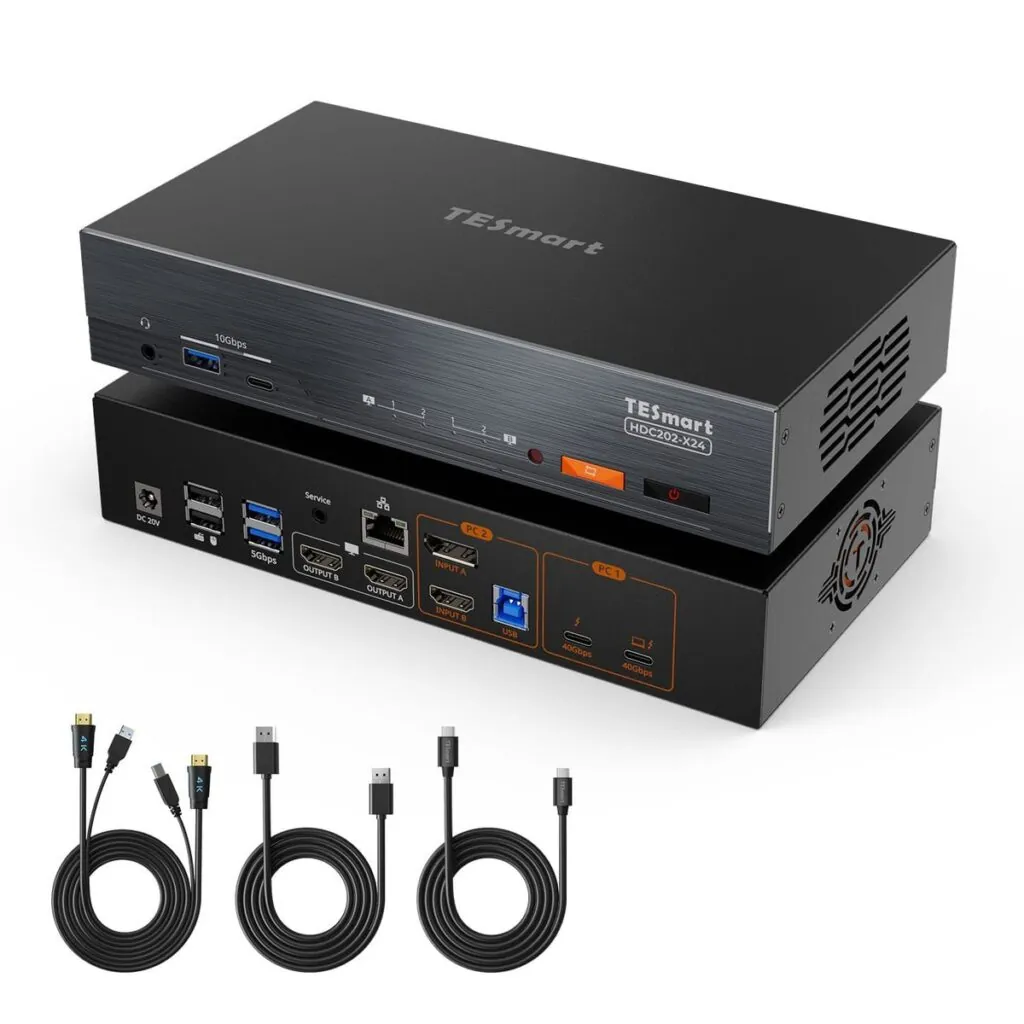
The TESmart HDC202-X24 is a KVM switch and docking station in one box. A Thunderbolt laptop and a desktop PC share two HDMI monitors, a keyboard, mouse, USB devices and wired Ethernet. The laptop connects with one 40Gbps USB-C cable that also charges it at up to 60W. This TESmart HDC202-X24 review is for hybrid workers who move between a work laptop and a home desktop every day.
TESmart HDC202-X24 review: the score
Research score: 6.8 / 10 (provisional)
The Gadgeteer used it for weeks without switching problems. EDID emulation keeps windows in place on both screens. It loses points for HDMI outputs capped at 4K60, owner reports of fan noise and charging whine, and few in-depth independent tests.
Researched from public evidence, not hands-on testing. Store and service problems are rated separately as the store risk. How scores work
Ports and specs
| Item | HDC202-X24 (TESmart figures) |
|---|---|
| Computers | PC1: Thunderbolt 4/3 or full-featured USB-C; PC2: DisplayPort or HDMI plus USB-B |
| Monitors | Two HDMI outputs, up to 4K60 each; 1440p at 120Hz and 1080p at 240Hz |
| Laptop charging | Up to 60W on PC1 only; laptops without 20V charging may get 7.5W |
| USB | 10Gbps USB-A and USB-C on the front, 5Gbps USB-A on the back, keyboard and mouse ports |
| Network and audio | Gigabit Ethernet shared with both PCs; headset and microphone jacks |
| Extra port | A 40Gbps USB-C port for PC1 only, not switched |
| Switching | Front button, IR remote, keyboard hotkeys, mouse wheel |
| Thunderbolt status | Thunderbolt 4 compatible, not yet Intel certified (certification in progress) |
What reviewers found
The Gadgeteer tested it for a few weeks in June 2025 with a Thunderbolt gaming laptop and a mini PC, on a sample TESmart supplied. It reported no switching problems and praised the port layout and the EDID emulation, which keeps each computer’s two-screen layout intact after a switch.
Its one limit was bandwidth. On a 3440 x 1440 ultrawide, the HDMI output topped out at 60Hz, so the reviewer recommends 1440p or 1080p screens for high-refresh gaming. It also wished for a single DisplayPort output at a higher refresh rate.
Known quirks
- Fan noise. TESmart describes an owner who found the fan loud under load; it added a quieter fan mode switchable by hotkey.
- Charging whine. Another owner heard a faint whine when charging a laptop through the dock. TESmart’s suggested fix is to use the laptop’s own charger.
- Mac limits. TESmart notes base M1, M2 and M3 Macs drive only one external display over Thunderbolt, so you will not get two extended screens from them.
- Uneven inputs. PC2 gets no charging and no 40Gbps port, and triple monitors are not supported.
- Hotkeys. They need a wired keyboard in the dedicated port; Bluetooth keyboards and some wireless receivers may not work.
How it compares
| Model | Computers and screens | Key difference | Best for |
|---|---|---|---|
| TESmart HDC202-X24 | Thunderbolt laptop + desktop, 2 x 4K60 HDMI | 60W charging, Gigabit Ethernet, 40Gbps port | Laptop-and-desktop desks |
| TESmart HKS202-M24 | 2 PCs, 2 x HDMI 2.1 | Up to 4K at 144Hz; no laptop charging | Two gaming desktops |
| TESmart CKS202-P23 | 2 USB-C laptops, 2 x 4K60 | USB-C with MST instead of Thunderbolt | Two work laptops |
| TESmart HDC203-PM24 | Laptop + desktop, 3 x 4K60 | DisplayLink for three screens, 100W charging | Triple-monitor desks |
Decision factors
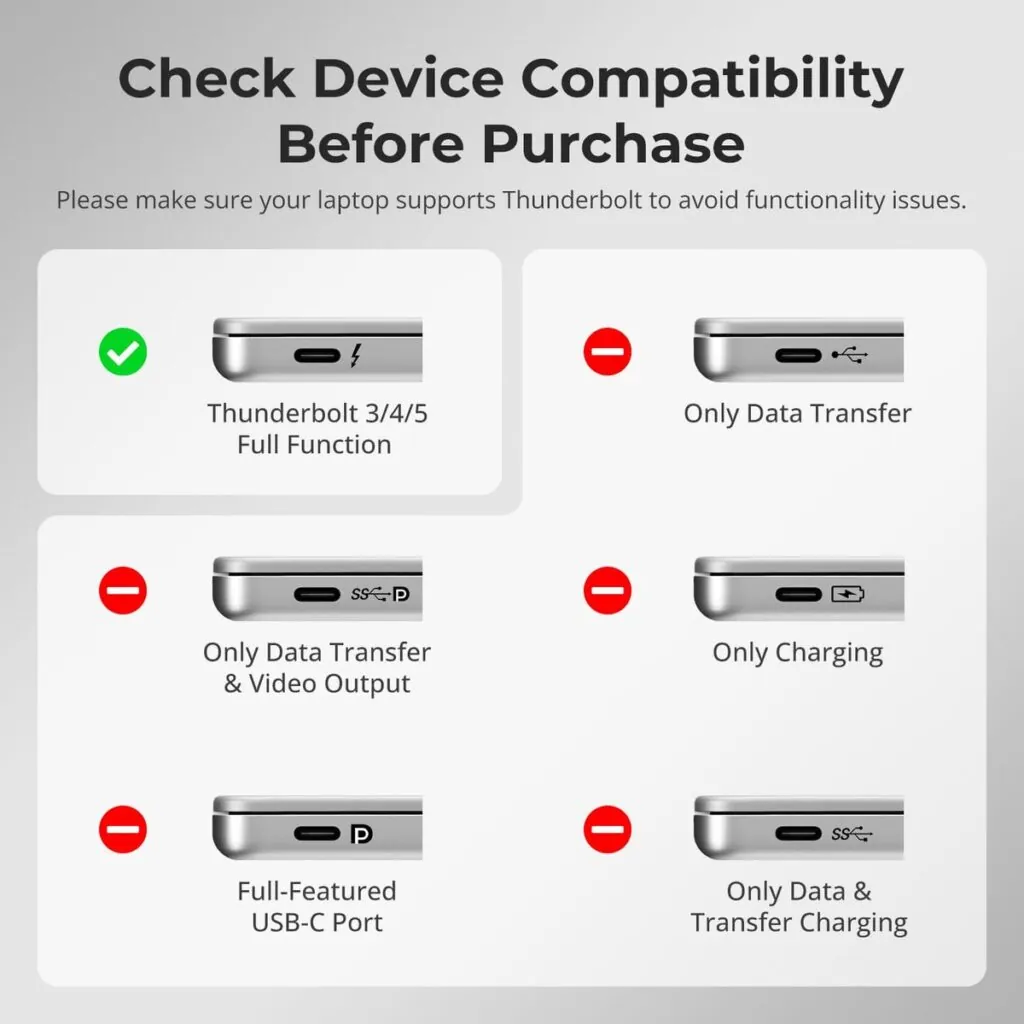
- Your laptop port. It needs Thunderbolt 3/4/5 or a full-featured USB-C port with video and charging; check TESmart’s chart.
- Your monitors. Above 4K60, or high refresh on an ultrawide, look at the HKS202-M24 instead.
- Charging needs. 60W suits most thin laptops; a power-hungry workstation laptop may charge slowly.
- Noise. If the box sits next to you, plan to use the quieter fan mode.
Who should skip it
Skip the HDC202-X24 if both your computers are desktops, you game at high refresh rates on 4K or ultrawide screens, or you need three monitors. Base M1, M2 and M3 MacBook owners who want two extended screens should skip it too.
For the warranty, returns, shipping and store ratings, see the TESmart brand review.
TESmart HDC202-X24 FAQ
Does the TESmart HDC202-X24 work with a MacBook?
Yes, over Thunderbolt or USB-C. TESmart says base M1, M2 and M3 Macs support only one external display, so they get one screen from the HDC202-X24. Pro, Max and base M4 models can drive two.
Can the TESmart HDC202-X24 run 144Hz?
Not at 4K. The TESmart HDC202-X24 outputs up to 4K at 60Hz per HDMI screen, 1440p at 120Hz or 1080p at 240Hz. The Gadgeteer found a 3440 x 1440 ultrawide limited to 60Hz.
Does the TESmart HDC202-X24 charge both computers?
No. Only the Thunderbolt laptop on PC1 charges, at up to 60W. The second computer connects by DisplayPort or HDMI plus USB-B and gets no power from the TESmart HDC202-X24.
Is the TESmart HDC202-X24 Thunderbolt certified?
Not yet. TESmart lists the HDC202-X24 as Thunderbolt 4 compatible, built on an Intel JHL8440 controller, and says Intel certification is in progress. Check your laptop’s port type before buying.
Sources
- TESmart HDC202-X24 product page (specs and FAQ), refund policy and support center (read November 14, 2026)
- TESmart case notes on fan noise and charging whine (read November 14, 2026)
- The Gadgeteer: TESmart Thunderbolt KVM switch review (June 4, 2025)
- YouTube: TESmart HDC202-X24 KVM review by MrTechVisuals
Prices and offers change often, so check the brand’s site for current details.